
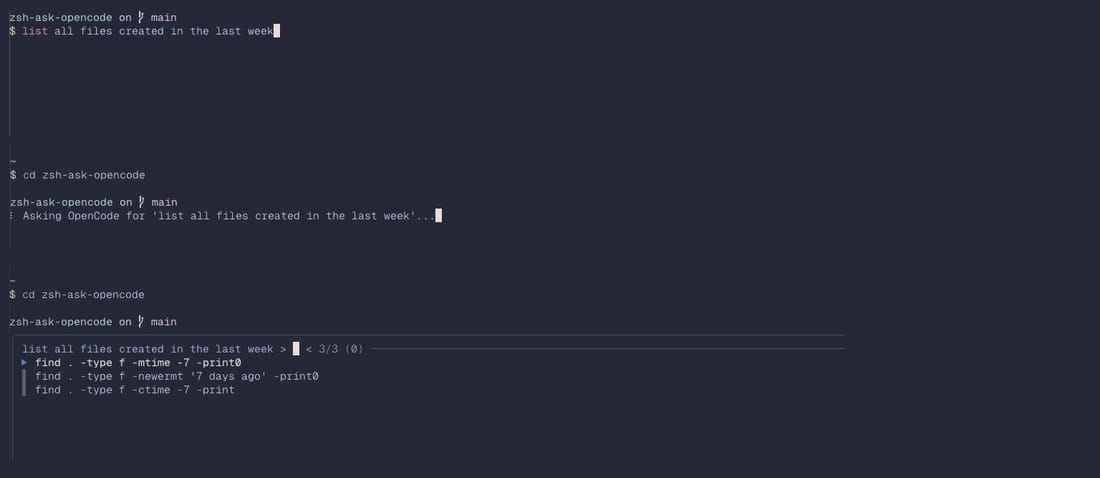
I was looking up the exact syntax of find for files modified in the last 7 days for the fifth time in a month. And I realized I was always doing the same thing: open ChatGPT/Google, ask for the command, copy it, close the session. Repetitive.
So I wrote a ZSH plugin that calls OpenCode directly from the shell. About 50 lines of code. Press a shortcut, write what you want in plain language, get the command. Then you decide whether to run it or not.
What It Does
The plugin adds a function that intercepts what you type in the terminal and sends it to OpenCode. Instead of having to remember the exact syntax of find, awk, or any other obscure command, you write what you want to do in English (or Italian) and OpenCode generates the command.
For example, you write "find all files modified in the last 3 days" and you get the correct command with all the right flags. Then you decide whether to execute it or modify it.
Why I Built It
OpenCode is powerful but usually you work in a separate interactive session. I wanted something faster, like the zsh-ask or nlsh plugins that already exist. The difference is that these use direct APIs from ChatGPT or other LLMs, while I wanted to leverage OpenCode because:
- It already has context of the project I'm working on
- It knows my shell configuration and operating system
- It supports local models via Ollama, so I can work offline
Basically I wanted the best of both worlds: the speed of a ZSH plugin with the contextual intelligence of OpenCode.
How It Works
The plugin is structured like a normal ZSH plugin. When you load it (via Oh My Zsh, Antidote or manually), it adds a function you can bind to a shortcut. I use Ctrl+O but you can configure it however you want.
When you press the shortcut:
- It captures what you've written in the shell buffer
- It sends it to OpenCode through its API
- It gets the generated command
- It inserts it in the buffer replacing the original text
At that point you see the generated command and can execute it with Enter or modify it. Nothing automatic, you always maintain control.
Simple Installation
If you use OhMyZsh, clone the repo in ~/.oh-my-zsh/custom/plugins/ and add it to the plugin list in your .zshrc. If you use Antidote just add andreacasarin/zsh-ask-opencode to your plugin list. Otherwise source the .plugin.zsh file directly.
You need to have OpenCode already installed and configured, obviously. The plugin assumes the opencode command is available in PATH.
Real Limitations
It's not perfect. There are a couple of things I know are limiting:
- Requires OpenCode installed locally, so it doesn't work on remote machines where you might only have SSH.
- Latency depends on the model you use. With gpt-5-mini (default) it takes 2-3 seconds, with local models it can be slower
- It doesn't keep conversation. Each request is independent, unlike OpenCode's interactive session
The latency part bothers me. I could probably add caching for similar commands, but I haven't done it yet. For now it works well enough for my daily use.
Is It Worth It?
Depends on how you work. I use complex commands about 10-15 times a day: stuff with find, grep, sed, awk that I never remember perfectly. For me it makes sense because I save 30 seconds every time I don't have to google or open man pages.
If you always use the same 5-6 commands, it's probably overkill. Traditional aliases work great in that case.
What's Missing
I'd like to add some features:
- History of generated commands, so I can see what I asked before
- Ability to regenerate if the first attempt isn't right
- Integration with ZSH's native history to learn from my patterns
But these are ideas. The plugin already does what I wrote it for.
Security Considerations
Important thing: always review commands before executing them. Models can generate dangerous stuff like rm -rf unintentionally. The plugin never executes anything automatically, but it's still good practice to check.
Also, if you use external APIs, the text you write gets sent out. With local models via Ollama this isn't a problem.
Alternatives That Exist
I'm not the first to do something like this. nlsh does basically the same thing but uses OpenAI APIs directly. zsh-ask is similar but more oriented to long conversations. LLM Shell uses Ollama locally.
My version uses OpenCode because I like its plugin system and the fact that it already keeps project context. But the alternatives are valid, depends on your workflow.
Next Steps
The code is on GitHub, MIT license. If you want to contribute or have ideas, PRs are welcome. It's a small project, so it's easy to understand how it works even if you've never written a ZSH plugin before.
For now I use it every day and it works. It's one of those tools that after a week you wonder how you did without it.